Background
As a data analyst in the lending industry, I work across three dimensions every day: asset analysis, conversion analysis, and team performance analysis. Behind each business area sits a full metrics system. Asset quality monitoring involves core indicators such as collection-entry rate, spread, and bad debt rate. Conversion funnel analysis requires tracking the full chain from application to disbursement. Collections team management focuses on metrics like collection efficiency, repayment rate, and recovered amount.
In practice, I used to open three large Excel files every morning just to review the data. Each file contained about 10 tabs, and together they covered nearly 30 business charts. A single review cycle took 1 to 2 hours. During that process, I had to log into databases repeatedly, run SQL queries, cross-check numbers across dimensions, and watch for anomalies. It was time-consuming and also easy to get wrong due to human fatigue.
As the business kept growing, both the data volume and the complexity of the metrics increased. Manual monitoring was no longer enough for day-to-day needs. That pushed me to ask a more practical question: could I hand part of the analytical framework to AI and turn it into a real data analysis partner that understands the business?
Feishu is the only collaboration platform used inside my company. Nearly all internal communication, file management, and knowledge sharing live in the Feishu ecosystem. Integrating the AI assistant into Feishu means users do not need to change any existing habits. They can simply send a request in a Feishu chat window, and the AI can call tools and return an analysis result directly. That “ask in Feishu, get the result in Feishu” experience is the most natural fit for the actual business workflow.
With that in mind, I chose OpenClaw as the AI Agent framework, deployed it to a cloud server, and integrated it with a self-built Feishu bot. The AI assistant handles business intent understanding, tool invocation, and structured results. Feishu serves as the single interaction entry point for all requests and feedback.
This article documents the full process, from environment preparation and framework deployment to Feishu integration, business Skill customization, and memory system design, for developers facing similar requirements.
1. Why This Stack
Why I Chose OpenClaw
When evaluating AI Agent frameworks, I focused on three dimensions: architectural flexibility, extensibility, and operational complexity.
In late February this year, I spent a full week researching the AI Agent frameworks available on the market. For the vertical use case of business data analysis, OpenClaw was the most mature solution I could find. It not only provides a multi-agent architecture and a Skill extension mechanism, but also ships with complete official support for Feishu integration. Compared side by side with alternatives, OpenClaw was the only framework that could satisfy my three core requirements at once: fast deployment, Feishu access, and custom business Skills. I did not find another real substitute.
The main reason OpenClaw made my shortlist was its multi-agent architecture. Unlike a single-agent chatbot that can only handle simple Q&A scenarios, OpenClaw can break a complex task into multiple sub-agents that execute separately. For example, “analyze yesterday’s asset data” can be split between one agent responsible for database querying and another responsible for metric calculation. That architecture has a clear advantage when you are dealing with multiple business lines and multi-dimensional data analysis.
The second key factor was the Skill extension mechanism. OpenClaw provides a standardized way to build Skills, which allowed me to package my own Python scripts and SQL query logic into tools the AI can invoke directly. That means the AI is not doing generic question answering. It is calling technical tools with actual business capabilities. In the asset analysis scenario, for example, I wrapped my SQL query scripts into an asset-metrics Skill. When the AI receives a request like “check this week’s D0 collection-entry rate,” it can understand the business meaning, call the right Skill, run the query, and return a structured result instead of a vague text reply.
The third factor was full official support for Feishu. OpenClaw provides a production-tested integration path covering bot creation, event subscription, message sending and receiving, and the rest of the full workflow. I did not need to start from scratch with the Feishu API. The official CLI was enough to complete the integration end to end.
Why Feishu
The answer is tightly tied to my company’s internal stack. Nearly all internal communication, file management, and knowledge sharing run inside the Feishu ecosystem. Feishu Drive stores our Excel data files, Feishu Docs holds data dictionaries and analysis standards, and Feishu groups are used for day-to-day business communication. Plugging the AI assistant into Feishu was the lowest-cost and best-experience option.
From the perspective of a daily user, this means no change in work habits and no extra software to install. I can simply open a private Feishu chat with the AI bot, ask a data question, and receive a structured result directly in the conversation. That “conversation as a service” experience is hard to replace with other entry points such as a web console or a standalone app.
From a technical integration perspective, Feishu Drive and Feishu Docs can also act as the relay layer for the AI’s memory system. Short-term memory stays in local files, while long-term memory is synced to a Feishu document so it can be reviewed from a phone at any time. That deeper integration with the Feishu ecosystem makes the assistant much more usable in a real business setting.
2. Preparation Before Deployment
Server Configuration
The AI Agent Gateway service runs on an ECS cloud server with the following configuration:
| Item | Spec |
|---|---|
| Instance Type | ecs.e-c1m2.large |
| CPU | 2 vCPU |
| Memory | 4 GiB |
| System Disk | 40 GB SSD |
| Operating System | Ubuntu 20.04 LTS |
| Public Bandwidth | Pay-by-traffic |
| Region | Malaysia (Asia Pacific Southeast) |
Environment Requirements
The following dependencies were installed on the server in advance:
Node.js
OpenClaw requires Node.js 18.x or later. I installed it with nvm:
curl -o- https://raw.githubusercontent.com/nvm-sh/nvm/v0.39.7/install.sh | bash
nvm install 18
nvm use 18
node -v  # Verify the version is v18.x.x
Network
The server needs outbound internet access. The installation process requires downloading OpenClaw-related packages, calling the Volcano Engine Coding Plan API, and establishing a WebSocket connection with the Feishu Open Platform. The following domains all needed to be reachable:
npmofficial registry- Volcano Engine API domains
- Feishu Open Platform API domains
Feishu Open Platform Account Setup
I created an internal enterprise app on the Feishu Open Platform and obtained the following credentials:
App ID: The unique identifier of the application.
App Secret: The application secret, used to obtain API access credentials.
Model Setup
I used Coding Plan from Volcano Engine as the default model provider. Coding Plan is ByteDance’s AI service for coding and reasoning models. I had already enabled the Coding Plan service in the Volcano Engine console and generated an API key for the later configuration steps.
3. Deploying OpenClaw
OpenClaw was already preinstalled on the Volcano Engine cloud server, so I did not need to deploy it manually. Volcano Engine Coding Plan is a consolidated model provider. Using the integration script provided by Volcano Engine, I selected MiniMax-2.5 as the AI model and connected Coding Plan to OpenClaw:
curl -fsSL https://lf3-static.bytednsdoc.com/obj/eden-cn/ylwslo-yrh/ljhwZthlaukjlkulzlp/install.sh | sh
This script is used to configure the model integration between Volcano Engine Coding Plan and OpenClaw. It is not used to install OpenClaw itself.
The working directory and file structure had already been prepared during server initialization:
./workspace/
├── config.yaml      # Gateway configuration
├── agents/          # Agent role definitions
└── skills/          # Skill directory (used later for business Skills)
After the configuration was complete, I started the Gateway service with:
openclaw gateway start
Once the service was up, I used openclaw status to confirm that all components were running normally.
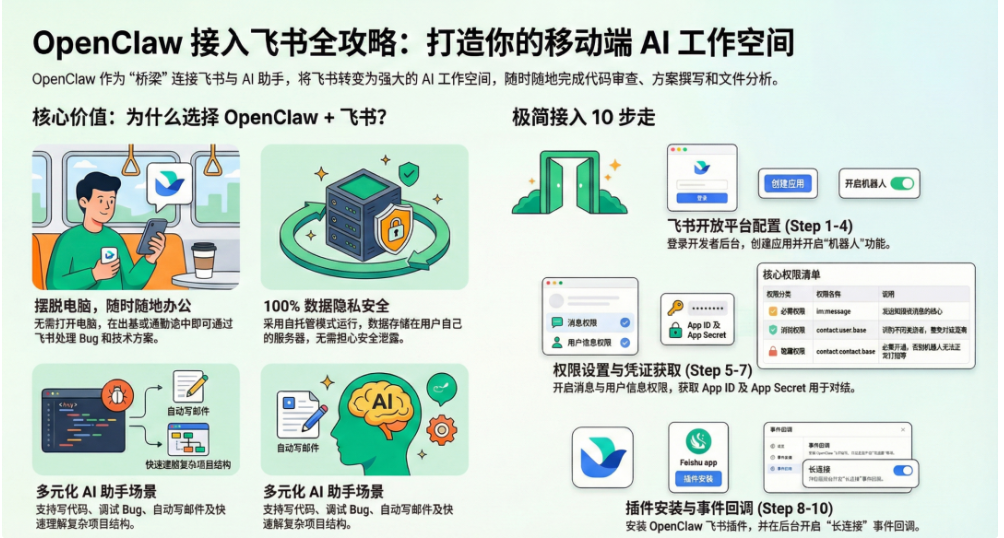
4. Integrating Feishu
I followed the official Volcano Engine documentation (https://www.volcengine.com/docs/6396/2189942) to complete the Feishu integration.
The key steps were as follows:
Step 1: Create a Feishu App
Create an internal enterprise app on the Feishu Open Platform, fill in the app name and description, then add the app capability for a bot.
Step 2: Configure Permissions
Under “Permission Management,” add the following permissions:
im:message- Receive and send messagesim:message:send_as_bot- Send messages as the botim:chat:readonly- Read chat listscontact:user.id:readonly- Read user IDs
Step 3: Configure Event Subscription
Under “Events and Callbacks,” complete the following setup:
- Callback configuration -> Subscription method -> choose “Use long connection to receive callbacks”
- Add event -> choose “Receive messages (
im.message.receive_v1)”
Choosing long-connection mode is the key step in the entire integration. OpenClaw can receive Feishu messages without a public callback URL, which greatly reduces deployment complexity.
Step 4: Publish the App
Click “Create Version,” fill in the version information, and publish it so the app becomes available inside the organization.
Step 5: Configure OpenClaw Feishu Credentials
Get the app’s App ID and App Secret from the “Credentials and Basic Info” page, then bind them through the OpenClaw CLI:
openclaw config set channels.feishu.appId 'cli_xxxx'
openclaw config set channels.feishu.appSecret 'your_secret'
openclaw config set channels.feishu.enabled true
Restart the Gateway so the configuration takes effect:
openclaw gateway restart
Step 6: Verify Connectivity
After startup, check the logs to confirm the Feishu connection status:
tail -f ~/.openclaw/logs/*.log | grep -i feishu
Once the feishu connected log appears, send a test message to the bot in a private Feishu chat and confirm that messages can be received and sent normally.
Additional Notes on Feishu Docs Integration
After the initial deployment, OpenClaw could chat normally, but I ran into a number of issues when I tried to integrate Feishu Docs. The bot frequently asked for reauthorization, and document permissions belonged to the AI bot rather than to the user, which meant the user could not modify the documents directly.
In early March, I found a post in the OpenClaw community that mentioned an official OpenClaw plugin released by Feishu specifically to solve the problem of insufficient bot permissions. I followed that document (https://bytedance.larkoffice.com/docx/MFK7dDFLFoVlOGxWCv5cTXKmnMh) and redeployed the integration.
After switching to the official plugin, OpenClaw was able to integrate with Feishu Docs cleanly. The process required only a one-time initialization and authorization, after which I could add, delete, query, and edit Feishu documents smoothly without repeated reauthorization.
5. Business Customization: From a General Assistant to a Domain Assistant
Goal: Teach the AI the Asset Analysis Framework
After the basic integration was complete, the AI was still just a general-purpose conversational assistant with no understanding of business logic. I needed to teach it the asset analysis framework step by step so it could understand business intent, call the right SQL queries, and return formatted metric results.
I broke the customization process into five steps.
Step 1 · Build the Data Source
The asset analysis data is stored in MySQL. I first created a nigeria_asset database, imported the daily updated asset data into it, and built a complete data dictionary.
The data dictionary is the foundation of the entire analysis system. It contains each field’s naming rules, business meaning, metric definition, and dimension classification standards. I stored it in a Feishu document so it would be easy to maintain and share with the team.
The table below lists the core fields in the asset data table:
Dimension Fields
| Chinese Name | Field Name | Description |
|---|---|---|
| Disbursement Date | lending_date |
The actual disbursement date of the order |
| Disbursement Week | week_date |
The week in which the order was disbursed |
| Disbursement Month | month_date |
The month in which the order was disbursed |
| Package Name | package_name |
The specific package name |
| Package Category | package_name_type |
Paid acquisition package / APK package |
| Product Type | product_type |
Single-loan / multi-loan |
| Multi-loan Segment | multi_type |
Existing-customer multi-loan for existing customers / existing-customer multi-loan for new customers / new-customer multi-loan |
| Channel | media_source |
Facebook / Google / TikTok / Organic / non-paid |
| Product Pricing | product_info |
Format: term_pre-fee_post-fee, for example 7_35_7 |
| Customer Type | customer_type |
5 = new customer, 10 = returning customer |
| Customer Segment | d_customer_type |
Pure new / not pure new (segmentation used only for new customers) |
| Front/Back Fee Type | pf_type |
Front-loaded / back-loaded |
| Risk Control Grade | user_score_level |
RG grade, from A to G with increasing risk |
| SMS Permission | sms_type |
Has SMS / historical SMS / no SMS |
| Number of Concurrent Debts | multi_cases_in60D |
Number of disbursed but unsettled orders in the past 60 days; values >= 6 are labeled as 6+ |
| Loan Cycle Count | double_times |
User borrowing cycle count; 0 = new customer, values >= 6 are labeled as 6+ |
Metric Fields
| Chinese Name | Field Name | Formula | Description |
|---|---|---|---|
| Disbursement Scale | |||
| Order Count | order_cnt |
— | Total number of disbursed orders in the period |
| Principal | principal |
— | Total principal amount disbursed in the period |
| Average Ticket Size | principal, order_cnt |
principal ÷ order_cnt | Average amount per order |
| Front-loaded Fee Rate | pf_amount, principal |
pf_amount ÷ principal | Service fee rate for front-loaded products |
| Back-loaded Fee Rate | interest_amount, principal |
interest_amount ÷ principal | Service fee rate for back-loaded products |
| Collection-Entry Metrics | |||
| D-1 Order Collection Entry | dpd_1_repay, dpd_1_cnt |
(1 − dpd_1_repay ÷ dpd_1_cnt) × 100% | Counted one day before due date |
| D-1 Amount Collection Entry | dpd_1_repay_amount, dpd_1_cnt_amount |
(1 − dpd_1_repay_amount ÷ dpd_1_cnt_amount) × 100% | Amount-based metric counted one day before due date |
| D0 Order Collection Entry | dpd0_repay, dpd0_cnt |
(1 − dpd0_repay ÷ dpd0_cnt) × 100% | Counted on the due date |
| D0 Amount Collection Entry | dpd0_repay_amount, dpd0_cnt_amount |
(1 − dpd0_repay_amount ÷ dpd0_cnt_amount) × 100% | Amount-based metric counted on the due date |
| Spread Metrics | |||
| D0 Spread | D0_spread, principal |
D0_spread ÷ principal | Spread on the due date |
| D3 Spread | D3_spread, principal |
D3_spread ÷ principal | Spread at the D3 checkpoint |
| D7 Spread | D7_spread, principal |
D7_spread ÷ principal | Spread at the D7 checkpoint |
| D14 Spread | D14_spread, principal |
D14_spread ÷ principal | Spread at the D14 checkpoint |
| D30 Spread | D30_spread, principal |
D30_spread ÷ principal | Spread at the D30 checkpoint |
| Current Total Spread | spread, principal |
spread ÷ principal | Total spread accumulated to date |
| Spread Growth Metrics | |||
| D0-D3 Growth | D0_spread, D3_spread, principal |
(D3_spread − D0_spread) ÷ principal | Spread increase from D0 to D3 |
| D3-D7 Growth | D3_spread, D7_spread, principal |
(D7_spread − D3_spread) ÷ principal | Spread increase from D3 to D7 |
| D7-D14 Growth | D7_spread, D14_spread, principal |
(D14_spread − D7_spread) ÷ principal | Spread increase from D7 to D14 |
| D14-D30 Growth | D14_spread, D30_spread, principal |
(D30_spread − D14_spread) ÷ principal | Spread increase from D14 to D30 |
| D30+ Growth | D30_spread, spread, principal |
(spread − D30_spread) ÷ principal | Spread increase after D30 |
| Bad Debt Metrics | |||
| Order Bad Debt Rate | outstanding_repay, outstanding_cnt |
(1 − outstanding_repay ÷ outstanding_cnt) × 100% | Bad debt rate after all orders mature |
| Amount Bad Debt Rate | outstanding_repay_amount, outstanding_cnt_amount |
(1 − outstanding_repay_amount ÷ outstanding_cnt_amount) × 100% | Amount-based bad debt rate after all orders mature |
Step 2 · Create the Analysis Skill
Based on the data dictionary, I translated the core asset analysis metrics into SQL query logic and packaged them as an OpenClaw Skill.
The Skill development consisted of two parts:
Writing SKILL.md
In the Skill’s SKILL.md, I defined the description, applicable scenarios, invocation method, and output format. The AI uses SKILL.md to understand the Skill’s capability boundaries and how it should be used.
Implementing the SQL Scripts
Under the scripts/ directory, I wrote Python scripts that query MySQL with SQL, fetch raw data, calculate metrics according to the business definitions, and return structured results. For example, the SQL logic for the D0 collection-entry rate looked like this:
SELECT
    COUNT(*) AS order_cnt,
    SUM(CASE WHEN dpd0_repay < dpd0_cnt THEN 1 ELSE 0 END) AS d0_overdue_cnt,
    ROUND(SUM(CASE WHEN dpd0_repay < dpd0_cnt THEN 1 ELSE 0 END) * 1.0 / COUNT(*), 4) AS d0_rate
FROM asset_data
WHERE week_date = '{target_week}'
Step 3 · Validate Metric Calculations
Once the Skill was created, I ran a systematic validation process:
- Execute the raw SQL directly in the database for the same metric and compare the result one by one with the Skill output
- Test edge cases, such as empty datasets or dimensions with no data
- Verify consistency across different dates and weekly dimensions
After manually confirming that all metric definitions were accurate, I formally added the Skill to the AI’s working skillset.
Step 4 · Build Scenario-Specific Analysis Frameworks
In the first version of the asset analysis Skill, I started by organizing the three most common analysis scenarios, corresponding to three core needs: new-customer analysis, returning-customer analysis, and spread forecasting. The concrete frameworks are shown below.
Scenario 1: New Customer Analysis Framework
| Breakdown Dimension | Specific Categories | Priority Metrics |
|---|---|---|
| Product Type | Core strategy, multi-loan | Collection-entry rate, spread |
| Channel | Facebook, Google, TikTok, Organic, non-paid | Collection-entry rate, average ticket size |
| Package | Seven acquisition packages + APK package | Collection-entry rate, spread |
| RG Grade | A, B, C, D, E, F, G | Collection-entry rate, spread |
Scenario 2: Returning Customer Analysis Framework
| Breakdown Dimension | Specific Categories | Priority Metrics |
|---|---|---|
| Product Type | Core strategy, multi-loan | Collection-entry rate, spread |
| Asset Type | Front-loaded, back-loaded | Collection-entry rate, spread |
| Loan Cycle Count | 1 to 6+ cycles | Collection-entry rate, bad debt rate |
| Number of Concurrent Debts | 1 to 6+ debts | Collection-entry rate, spread |
| RG Grade | A, B, C, D, E, F, G | Collection-entry rate, spread |
| Package | Seven acquisition packages + APK package | Collection-entry rate, spread |
Scenario 3: Spread Forecasting Framework
| Slice Node | Spread Growth Value | Forecast Logic |
|---|---|---|
| D0 | — | Same-day spread baseline |
| D3 | D3 − D0 | Spread growth rate |
| D7 | D7 − D3 | Spread growth rate |
| D14 | D14 − D7 | Spread growth rate |
| D30 | D30 − D14 | Spread growth rate |
| To Date | spread − D30 | Cumulative spread growth rate |
Step 5 · Automate Daily Data Updates
Data freshness is the foundation of effective analysis. I created a scheduled task (Cron Job) that runs every day to read the latest Excel data file provided by the business team, clean and transform the data, and then overwrite the corresponding date-partitioned tables in MySQL.
The job is scheduled for 6:00 every morning so the AI can query the latest data before the workday begins.
Next Areas for Expansion
After the asset analysis Skill went live, I followed the same approach to gradually build a conversion analysis Skill and a collections analysis Skill, eventually forming a complete AI analysis system covering all three business lines.
6. Memory Management
I implemented an automated memory management system through scheduled tasks. Every night at 23:59, the system runs a memory management workflow that archives the day’s conversation records and extracts key information into long-term memory.
Design Approach
The memory system is split into two layers, “short-term memory” and “long-term memory,” which solve two separate problems: contextual completeness and persistence of key information.
Short-Term Memory
Each day’s conversation content and operation records are automatically written into that day’s .md file, for example memory/2026-05-19.md.
This design has several advantages:
- It does not depend on external storage. Local files are enough to preserve the full context.
- The files are organized by date, which makes it very easy to trace back to conversations from a specific day.
- The files are in Markdown format, so they are pleasant to read.
Long-Term Memory
Short-term memory files keep accumulating, and storing all of them as long-term memory would make the file bloated. To avoid that, I designed a once-a-day “memory extraction” workflow:
- At the end of each day, extract the key information worth remembering from that day’s conversations
- Key information includes business decisions, important definition changes, user preferences, and system architecture adjustments
- Write the extracted content into
MEMORY.md, which acts as the single source of truth for long-term memory
MEMORY.md uses a structured format organized by topic, making later retrieval fast.
Syncing to Feishu
To make long-term memory easy to review and manage from a phone, I configured MEMORY.md to sync automatically to a Feishu document. A scheduled task updates the Feishu document with the local file content.
This design provides several benefits:
- The AI’s long-term memory can be reviewed from a phone at any time
- Feishu documents support full-text search, which makes locating information efficient
- Multi-device sync removes device limitations
7. Experience Using Different Models
I have used the following models in practice. Here is a summary of how they felt in actual use:
| Model | Use Cases | Strengths | Weaknesses | Personal Take |
|---|---|---|---|---|
| MiniMax-2.5 | Daily conversation, data analysis | Stable conversational understanding, accurate business intent parsing, good multi-turn context retention | Slower on complex reasoning tasks | Better at article-style output, with professional wording and a rigorous tone; well suited for formal content |
| GLM-4.7 | Daily conversation, data analysis | Fast response speed, balanced performance on everyday Q&A tasks | Limited long-text analysis ability | Good for informal reporting; often adds charts and emojis, which makes content easier to read |
| Doubao-Seed-2.0-Code | Code generation, complex reasoning | Strong at code-related tasks | Slow response speed | Used less often |
| Kimi-K2.5 | Daily conversation, task execution | Balanced at conversational understanding and instruction following | Slow response speed | Used less often |
| DeepSeek-V3.2 | Daily conversation, complex reasoning | Stable performance in complex reasoning scenarios | Slow response speed and weak proactive problem-solving ability | Not recommended |
| GPT-5.4 | Daily conversation, data analysis, task execution | Fast response speed and very high accuracy in data calculation | — | Became my main everyday model after April this year, gradually replacing MiniMax |
8. Conclusion
This article records the full journey, from the framework research I did in late February, to the deployment I completed in March, to the model switch I made in April. The core steps can be summarized as follows:
- Technology selection: I spent a week in late February researching options. OpenClaw was the most mature solution for business data analysis at the time. Volcano Engine Coding Plan provided the model layer, and Feishu was the only practical integration target because of the company’s ecosystem.
- Environment preparation: Malaysia-based cloud server (2 vCPU / 4 GiB / Ubuntu 20.04 LTS), Node.js 18.x, a self-built app on the Feishu Open Platform, and a Coding Plan API key.
- Deployment and integration: OpenClaw was preinstalled on the cloud server, an automated helper completed the Coding Plan model integration, the official CLI handled Feishu bot creation and credential binding, and the Volcano Engine documentation guided event subscription and permissions. In March, I found the official plugin through an OpenClaw community post, which resolved Feishu document permission limitations.
- Business customization: Build a MySQL database and import data -> establish a complete data dictionary -> package the asset analysis Skill -> build scenario-specific analysis frameworks (new customer / returning customer / spread forecasting) -> schedule daily automated data updates.
- Memory management: Run the memory workflow automatically every day at 23:59, write short-term memory into the day’s
.mdfile, extract key content intoMEMORY.md, and sync it to a Feishu document.
After three months of use, the AI assistant can now understand the business logic behind asset analysis and provide real-time data queries and metric analysis inside Feishu, greatly improving the efficiency of daily data review. The same approach can be extended later to conversion analysis and collections analysis Skills, forming a complete AI-driven business analysis system.
Future Plans
Next, I plan to expand the assistant in the following directions:
- Conversion Analysis Skill: Package the full application -> approval -> disbursement analysis framework into a Skill to cover the conversion dimension that has not yet been integrated into the three business lines.
- Collections Analysis Skill: Use the same workflow as asset analysis to build a Skill for collections team management and complete coverage of all three business lines.
- Multi-agent collaboration: Explore splitting asset, conversion, and collections into separate agents and use OpenClaw’s multi-agent architecture to create clearer responsibility boundaries.
- Metric anomaly alerts: Build anomaly detection logic on top of the existing scheduled tasks so that when a core metric fluctuates abnormally, the system can automatically push an alert to Feishu.
References
- Volcano Engine official documentation: Connecting Coding Plan to OpenClaw — https://www.volcengine.com/docs/82379/1928261?lang=zh
- Volcano Engine official documentation: Connecting OpenClaw to a Feishu assistant — https://www.volcengine.com/docs/6396/2189942?lang=zh
- Official Feishu plugin: OpenClaw Feishu integration configuration — https://bytedance.larkoffice.com/docx/MFK7dDFLFoVlOGxWCv5cTXKmnMh